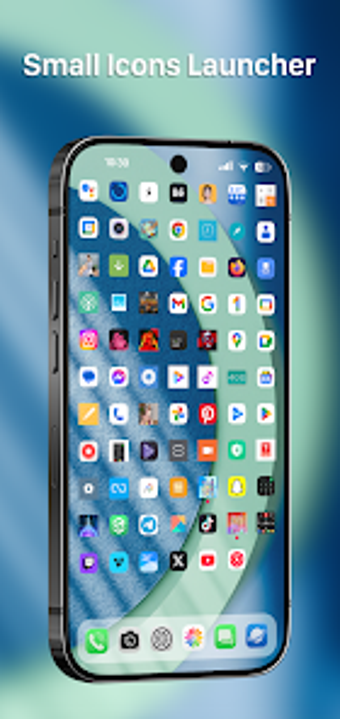
Small Icons Launcher from EasternStudio.Inc is an Android launcher designed to compress the home screen into a high-density app grid for faster access. The app reduces icon size and tightens spacing so more shortcuts appear on a single page, and includes adjustable icon scaling, integrated search, folder support, and widget placement. It targets power users and owners of smaller devices who prefer a single-screen, function-first layout that minimizes swiping and speeds app retrieval.
Small Icons Launcher converts the home screen into a dense app dashboard
The app focuses on making the home surface a compact directory rather than a decorative tableau. It accomplishes this by offering adjustable icon scaling and high-density grid layouts that allow many more shortcuts per page than typical launchers. That design is intended so users can view dozens of apps at a glance, reducing the need for nested folders or multiple screens when most essentials must be visible immediately.
How much control does it give over icon density and grouping?
Control is granular: users can resize icons and choose tighter grid configurations, and the launcher supports folders to collect related shortcuts. An integrated search speeds direct app launches without hunting icons. The app also accepts standard widgets, so users can mix compact shortcuts with functional widgets, creating a hybrid screen that combines immediate access with glanceable information.
Does the launcher keep background resource use low on constrained hardware?
The developer built the tool with a lightweight architecture aimed at minimal memory and CPU consumption, which makes it suitable for older or smaller devices. The combination of a pared-down interface and a focus on density reduces runtime overhead compared with feature-heavy alternatives. This design choice targets users who want high information density without a noticeable increase in background processing on modest hardware.
Is setup and daily use approachable for its intended audience?
Setup follows a straightforward path: the interface favors utility over decorative controls, so initial configuration centers on choosing an icon scale and grid. The app targets power users who accept a utilitarian workflow, and daily operation emphasizes fewer swipes and quicker reachability. Users who prefer decorative theming or animated effects may find the app purposefully plain, while those who prioritize efficient navigation benefit from the compact approach.
A practical, function-first choice for efficiency-minded users
Small Icons Launcher is a pragmatic option for power users who need a compact, glanceable arrangement of apps and accept trade-offs in decorative customization. Its focused design rewards users who prioritize quick access and low resource use, and it suits devices with limited display area. Those who prefer elaborate visual theming or large, spacious icons should consider a different launcher aligned with those preferences.
Pros
Adjustable icon scaling increases visible shortcuts per screen
High-density grid layouts show dozens of apps at once
Integrated search speeds app launching without extensive swiping
Lightweight architecture reduces memory and CPU demands
Cons
Limited visual theming compared with feature-heavy launchers
Intentional utilitarian layout may not suit casual, visually-oriented users
Laws concerning the use of this software vary from country to country. We do not encourage or condone the use of this program if it is in violation of these laws. Softonic may receive a referral fee if you click or buy any of the products featured here.